Blog · Build log · September 29, 2026 · James Forrester
How do you build an AI memory for your business that stays current?
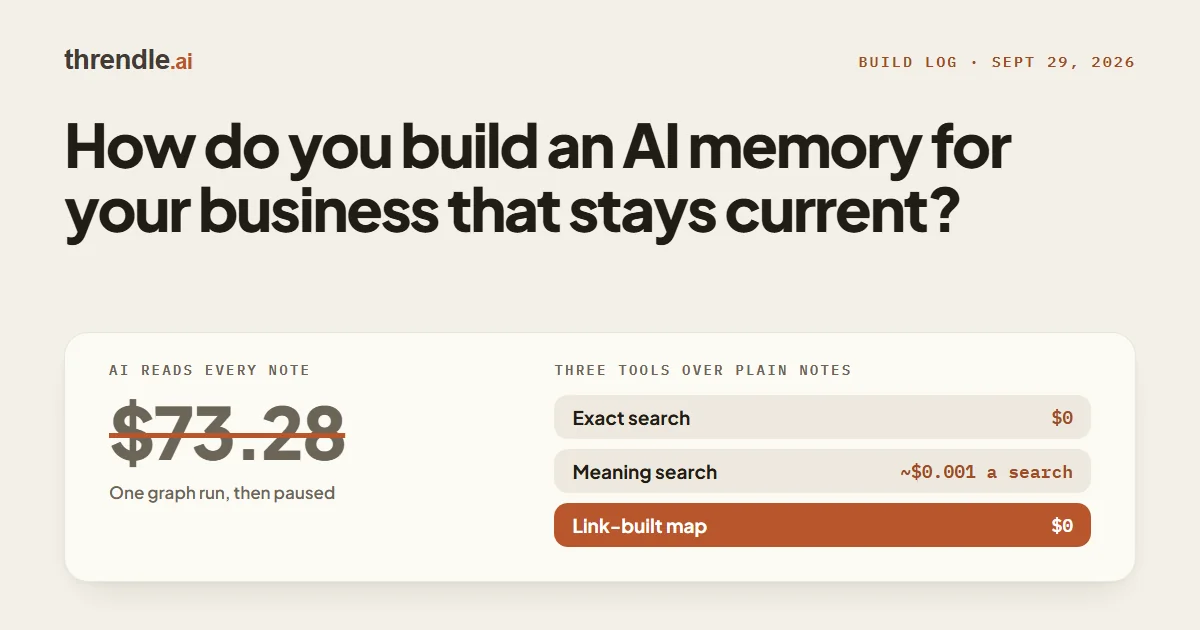
An AI memory stays current when the facts live in plain files and the AI searches those files at the start of every task. Our setup has three parts: an exact full-text search, a search by meaning, and a map of the notes built by plain code. The full-text index and the map both update within about 10 minutes of an edit, so the AI reads the current business.
This entry explains each part, how a session uses it, and what broke along the way. If you are new to our build log, it is where we document what we try, including the parts that failed.
Key takeaways
- An AI session starts with an empty context window, so the business has to live in files the AI can find and read every time.
- Keep the facts in plain notes, one topic per file, and add exact and meaning-based search once the notes outgrow what the AI can hold.
- Our AI-built graph cost $73.28 in a single run at Claude Haiku API rates, while the graph built from real links by plain code costs $0.
Why does an AI forget your business between sessions?
An AI forgets because nothing carries over from one session to the next unless it is written down and loaded again. Anthropic's guide to how Claude remembers your project states that every Claude Code session begins with a fresh context window. Anthropic's page on context windows describes that window as the model's working memory.
The same memory guide names two mechanisms that do carry knowledge across sessions. CLAUDE.md is a file of instructions you write, and auto memory is where Claude saves notes for itself. Claude treats both "as context, not enforced configuration," so a memory file is advice the AI reads.
The context window page describes a second limit: recall can degrade as the window fills, a problem Anthropic calls context rot. Loading every note therefore works against recall, so the AI needs a fast way to find the few notes relevant to the current task.
Where should the business knowledge live?
Our business knowledge lives in an Obsidian vault, which is a folder of notes on our own machine. Obsidian stores each note as a plain text Markdown file, so any AI can read the notes directly and nothing is locked inside one app. The folder is kept in git version history, which records every change and lets us undo any of them.
Two AI tools read the same vault: Claude Code, Anthropic's coding assistant, and Cowork, its assistant for multi-step tasks. An earlier build-log entry explains why we build on Claude. Until September 23, 2026, Claude Code saved what it learned to a folder that Cowork could not see. We moved its seven saved memories into the vault, and both tools now share one memory folder.
Each file in that folder holds one fact, and a single index file, MEMORY.md, lists each file on one line with no further detail. Anthropic's memory guide describes the same pattern, with MEMORY.md working as an index. Because the index stays short, every session can read it in full, while the detail stays in the file it points to.
What are the three parts of our AI memory now?
Our AI memory is three tools over the same notes, two searches and a map, all running on our own server. None of them costs anything to run except one reranking step by Jev, TypeSafe's reranking model, which is covered below. Each part answers a different kind of question.
Search became necessary once the notes grew to roughly 1 million tokens, where a token is the unit of text a model reads. In its Contextual Retrieval article (September 2024), Anthropic says a knowledge base under about 200,000 tokens can simply go into the prompt. Ours is about five times past that line, so the AI has to retrieve the relevant notes instead of reading everything. Newer models can hold about 1 million tokens. Anthropic notes that recall degrades as the window fills, however, so retrieval is still the better approach.
| Part | Question it answers | AI used | Cost to run | How current |
|---|---|---|---|---|
| Exact full-text search | An exact name, ID, number or phrase | None | $0 | Within about 10 minutes of an edit |
| Meaning search | A question in plain words | A local embedding model, then Jev to rerank | About $0.001 a search | Re-indexed as notes sync |
| The graph (a map) | Which skill, file and tool fit a job | None to build; a free model names clusters | $0 | Within about 10 minutes of an edit |
Exact search: a full-text index
The first part answers questions that contain an exact name, ID, number or phrase. It is a full-text index built on SQLite FTS5, the full-text search feature of the SQLite database. We did not build it ourselves; we installed two ready-made open-source tools, obsidian-web-mcp and obsidian-web-mcp-fts, both under the MIT licence.
We run both tools read-only, so the AI can search the notes through this index but cannot change them. The tools rebuild the index when a file changes, so it is current within about 10 minutes of an edit. On September 25, 2026, the index held 617 notes.
The semantic layer: search by meaning
The second part, added on September 27, 2026, answers questions asked in plain words. Exact search fails when a note uses different words from the question, and meaning search closes that gap by matching on what the text means.
We built it to the recipe in Anthropic's Contextual Retrieval article and TypeSafe's re-ranking cookbook. The steps run in this order:
- The indexer splits each note into chunks at its headings.
- The BAAI/bge-small-en-v1.5 model turns each chunk into an embedding, a list of numbers that represents its meaning. The model runs locally on the server's processor.
- The search matches a question two ways: by embedding, and by BM25, a standard keyword ranking formula.
- Reciprocal rank fusion merges the two result lists. The method, from Cormack, Clarke and Büttcher (SIGIR 2009), rewards results that rank high on either list.
- Jev, TypeSafe's model, reranks the top 20 results by scoring how well each chunk answers the question. That step costs about $0.001 a search.
We left one part of Anthropic's recipe out on purpose. Contextual Retrieval has a language model write a short context line for every chunk, which would have spent our Claude plan across thousands of chunks. Instead, each chunk carries its note's title, description and heading.
The layer had to pass a gate before we relied on it. On September 27, 2026, we asked it five test questions. They covered a client's next meeting, where image assets are kept, how to post a carousel, the self-improving website and why the AI graph was dropped. Each answer came back from the right note.
The graph: a map built without AI
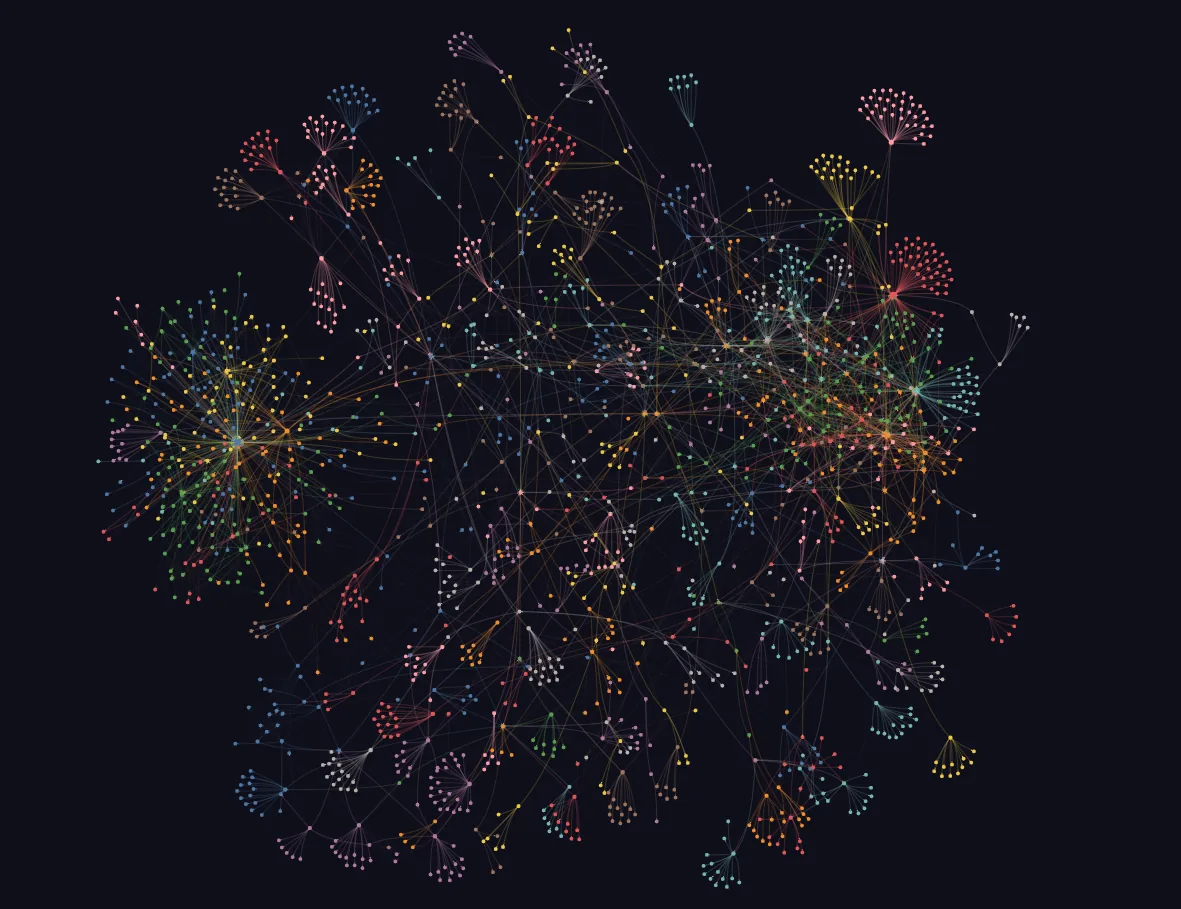
The third part is a knowledge graph, which is a map of things, called nodes, and the links between them. It tells the AI which skill, file and tool fit a job. Since September 25, 2026, plain Python code on our server has built it without any AI reading the notes.
The code reads structure that already exists in the files: real links between notes, file paths mentioned in a note, headings, folders and front matter. A scheduled job rebuilds the graph within about 10 minutes of an edit, and each rebuild takes about 4 seconds. A free model, NVIDIA Nemotron Ultra on its free tier, only names the clusters and tags shared concepts, one call at a time.
The trade-off is that the graph now shows real links, not concepts an AI inferred from reading the notes. Search covers what the links miss.
How does a session use the memory?
A session starts every task by asking the graph, in plain words, for the skill, paths and tool the job needs. For an exact name or number, it runs the full-text search, and for a question in plain words, it runs the meaning search. The AI then opens the file those tools point to and reads it before acting.
The graph only points to files, and when the graph and a file disagree, the file wins. Our instructions also tell the AI to check a tool-finder before it says a tool does not exist. The tool-finder ranks every connector tool and our own skills by meaning.
All of these tools reach the AI through connectors built on MCP, the Model Context Protocol. Anthropic introduced MCP on November 25, 2024, as an open standard for connecting AI assistants to the systems where data lives. Our post on the infrastructure weeks covers how we first connected tools to Cowork over MCP.
Until September 27, 2026, each session also read a "read-first block" of standing orders and the last three handoff notes. We retired both that day, and a session now learns what changed from the memory itself. A start-up hook lists the last 24 hours of git commits, and the graph and search cover the rest. Pending work lives on one task board, not in notes.
One rule keeps the memory current: when something is retired, the stale text is deleted, not annotated or struck through. Git keeps the history, so nothing is lost.
What we got wrong, so you don't have to
Each mistake below changed how the memory works today.
The AI-built graph cost far more than Claude Code estimated
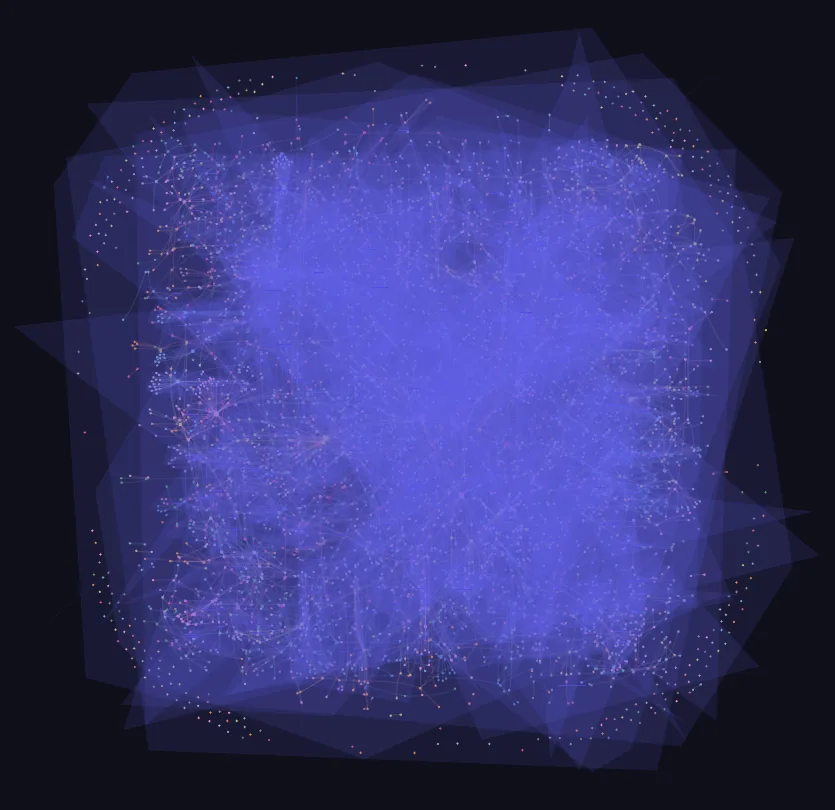
Our first graph was built by having Claude read the notes. Priced at Claude Haiku API rates, three of those runs cost $6.41 for 6 chunks, $19.64 for 35 chunks and $73.28 on September 24, 2026. About $49 of the $73 was cache writes, the charge for storing prompt text for reuse, because each chunk started a full Claude Code session.
The September 24 run used 90.2 million tokens and hit the 5-hour usage limit at 3:22 a.m. with nothing published. About 66 million of those tokens went to reading rendered PDFs and images. Claude Code, the AI assistant doing the build, had estimated "pennies" by counting raw tokens, and its estimate missed all of that.
We paused the AI graph on September 25, 2026, and rebuilt it with plain code, which now costs $0 to run.
A cheaper model skimmed long files
During the AI-graph period, one build switched to a cheaper model to save money. That model skimmed long files instead of reading them in full. The note that lists every tool we have connected dropped from 69 nodes to 6, so most of its entries vanished from the map. We added a publish gate that blocked any build in which a long file's node count halved.
Our AI assistant blamed the free model for its own mistake
The free-tier model we use for naming clusters appeared to stall. Claude Code had run three models back to back on one free key, even though I had warned it, and then reported the models as the problem. Run alone, one call at a time, the model answers in about a second.
Notes went stale and repeated themselves
A memory that grows for months collects old facts and copies of the same section. Jev now helps keep the notes clean in three ways.
- Deduplication. On September 27, 2026, a first pass compared 2,532 sections from 434 notes and found 207 note pairs to check. Jev marked 44 as duplicates, sent 142 to a person and marked 21 as different, in 5 seconds. A deeper check found only 12 whole-file duplicates, and the rest shared a section. Nothing is deleted automatically, because a person approves every duplicate removal.
- Hygiene sweeps. When a fact is retired, each passage that mentions it is checked against the retired fact. A passage is removed only when Jev is at least 0.8 confident and agrees with the agent; otherwise, a person decides.
- Reranking. Jev reranks every meaning search, as described in the semantic layer section above.
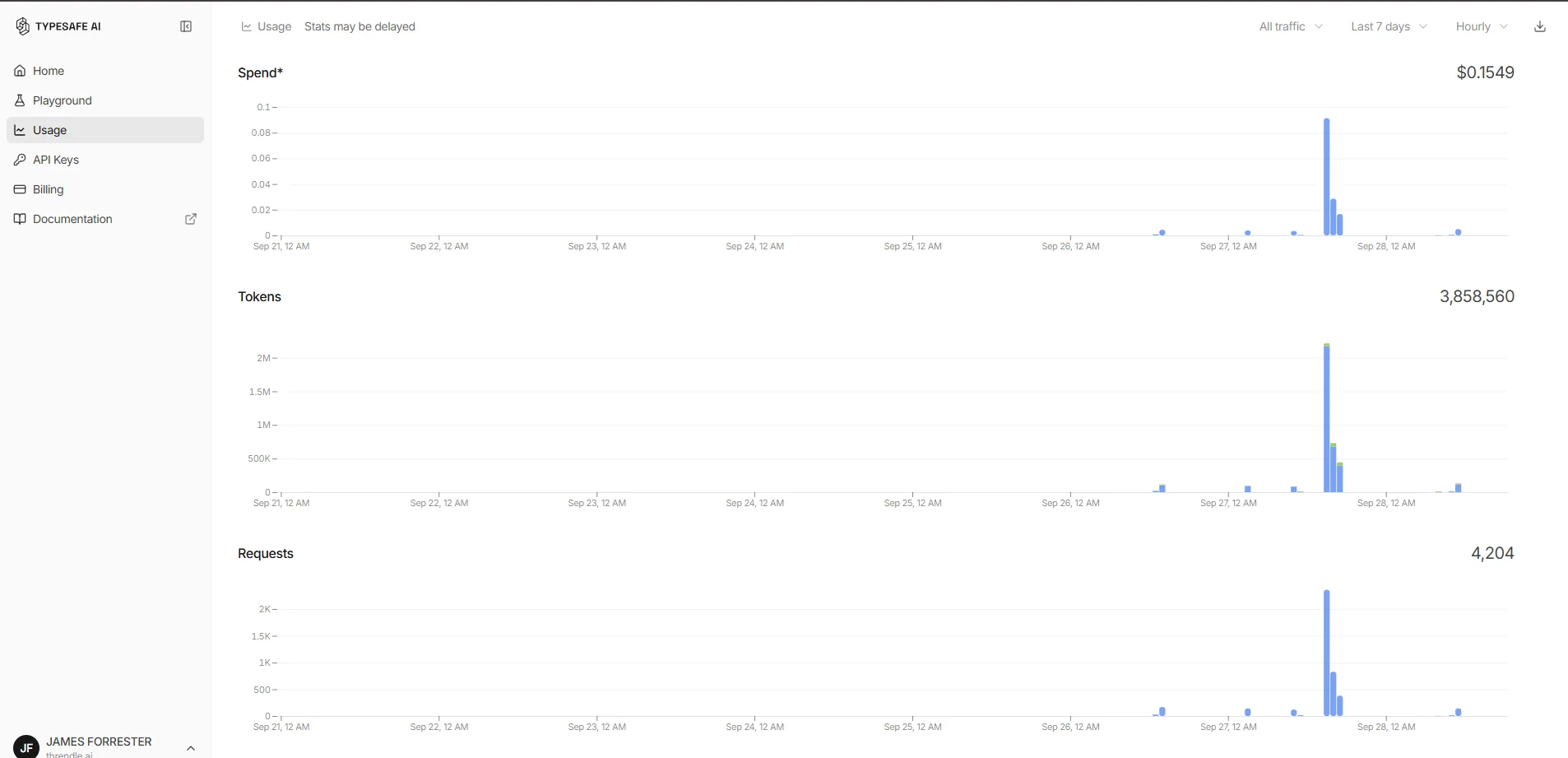
TypeSafe's usage dashboard shows what Jev has cost so far. For the 7 days from September 21 to 28, 2026, it recorded 4,204 requests and 3,858,560 tokens, for a total spend of $0.1549. That window includes the September 27 deduplication run. TypeSafe estimates the spend at $0.042 per million input tokens, and output tokens are free.
Cowork had the graph and did not use it
Cowork had the graph connector from the start and still acted on stale context, because its global instructions never mentioned the graph. We added a "first action, every task" instruction, which fixed the problem. That instruction is still advice the AI reads, not enforced configuration, which is the limit Anthropic's memory guide describes.
How can a small business copy this?
You do not need a server or a knowledge graph to use the same habits. Steps 1, 2 and 4 cost nothing and need no server, and step 3 is worth adding only when you need it.
- Keep your pricing, processes and customer notes in plain files, one topic per file, in version history.
- Keep a one-line index of those files, and tell the AI to read the index first and open only the file that fits the task.
- Once the notes outgrow what the AI can hold, add a ready-made search tool that matches both keywords and meaning before anything more complex.
- When something is retired, delete the stale text instead of annotating it.
Plain notes hold what the business knows, and search lets the AI find the right note for each task. Deleting retired facts keeps the memory current.
Download this post as a PDF to keep or share (9 pages).
If you would like to see where AI could save your business time, take the 3-minute diagnostic. Get a prioritised breakdown with exact hours and cost benchmarks.